Showing posts with label Reading/Tutorial. Show all posts

Tuesday, October 2, 2012

HTML Useful Character

HTML Useful Character Entities
Note: Entity names are case sensitive!
Result
Description
Entity Name
Entity Number
non-breaking space
 
 
<
less than
<
<
>
greater than
>
>
&
ampersand
&
&
¢
cent
¢
¢
£
pound
£
£
¥
yen
¥
¥
euro
€
€
§
section
§
§
©
copyright
©
©
®
registered trademark
®
®
trademark
™
™

More Info.

Widget Browser: Image Gallery

The Widget Browser:


Simple way to add an image gallery (lightbox) in Dreamweaver:


Dreamweaver Horizontal Spry Menu Bar


Text Book:
http://proquestcombo.safaribooksonline.com/book/web-design-and-development/9780321718143/building-pages-with-dynamic-elements/ch14lev1sec1

http://proquestcombo.safaribooksonline.com/book/web-design-and-development/9780133006018/firstchapter#X2ludGVybmFsX0ZsYXNoUmVhZGVyP3htbGlkPTk3ODAxMzMwMDYwMTglMkZhcHAwNXNlYzFsZXYx


Change The Cell Width of Spry Menu Bar

Change menu-image

ul.nav {
list-style: none;
border-top: 0px solid #666;
margin-bottom: 15px;
color:#CC66CC;
}

ul.nav li {
border-bottom: 0px solid #666;
        background-image: url(images/menu-bg.jpg);
        color:#CC66CC;
}

ul.nav a, ul.nav a:visited
padding: 5px 5px 5px 15px;
display: block;
width: 160px;
text-decoration: none;
color:#CC66CC;
}

ul.nav a:hover, ul.nav a:active, ul.nav a:focus
background-image: url(images/menu-bg-1.jpg);
color: #FFF;
}


--> menu-bg.jpg
--> menu-bg-1.jpg

Dreamweaver 1: Online Tutorial

Creating new documents

Adding structure to text

Placing images on the page

Creating links in Dreamweaver

Centering a Horizontal Menu Bar

Centered Menu Basic Example
http://matthewjamestaylor.com/blog/beautiful-css-centered-menus-no-hacks-full-cross-browser-support#

CSS Centered Menu
http://matthewjamestaylor.com/centered-menus/#

Navigation Bar (w3school)

Centering a horizontal spry menu

Customize spry menu


CSS Menus


http://www.cssplay.co.uk/

Menu one
A simple change of border style on :hover.
Menu two
A border style to look like a button.
Menu three
A neon glow menu.
Menu four
A right border change on :hover.
Menu five
Text movement on :hover.
Menu six
Border art to indicate the link on :hover.
Menu seven
Additional link text on :hover.
Menu nine
A shadow added on :hover.
Menu ten
Indented text on :hover.


-------------------------------------------------------------------------------------------------------

CSS Menu Maker


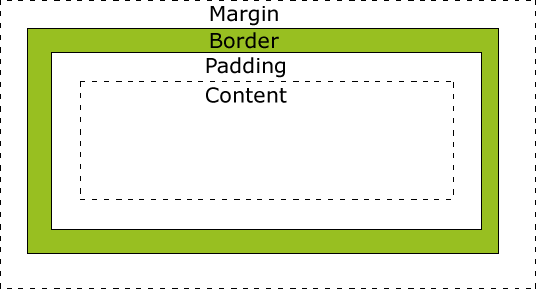
CSS Box Modle / Padding

CSS Box Modle / Padding


  • Margin - Clears an area around the border. The margin does not have a background color, it is completely transparent
  • Border - A border that goes around the padding and content. The border is affected by the background color of the box
  • Padding - Clears an area around the content. The padding is affected by the background color of the box
  • Content - The content of the box, where text and images appear
Padding
The padding clears an area around the content (inside the border) of an element. The padding is affected by the background color of the element.
The top, right, bottom, and left padding can be changed independently using separate properties. A shorthand padding property can also be used, to change all paddings at once.
Possible Values

Value

Description

length

Defines a fixed padding (in pixels, pt, em, etc.)

%

Defines a padding in % of the containing element

The padding property can have from one to four values.
  • padding:25px 50px 75px 100px;
    • top padding is 25px
    • right padding is 50px
    • bottom padding is 75px
    • left padding is 100px
  • padding:25px 50px 75px;
    • top padding is 25px
    • right and left paddings are 50px
    • bottom padding is 75px
  • padding:25px 50px;
    • top and bottom paddings are 25px
    • right and left paddings are 50px
  • padding:25px;
    • all four paddings are 25px

Resources from "http://www.w3schools.com/css/css_padding.asp"

Monday, September 17, 2012

Web Font Choice

Web Font Choice {html&css: p. 277~278} 
https://typekit.com
www.fontex.org
www.fontsquirrel.com
www.openfontlibrary.org
------------------------------------
Google Web Fonts: www.google.com/webfonts
Google Developer: https://developers.google.com/webfonts/docs/getting_started

A Designer's guide to Webfonts:
http://www.fontshop.com/education/pdf/webfonts.pdf
------------------------------------

> Example
Textbook: Chap.12 (p.277)

CSS:
@font-face {
    font-family: 'ChunkFiveRegular';
    src: url('fonts/chunkfive.eot');}
  
 h1, h2 {
    font-family: ChunkFiveRegular, Georgia, serif;}
 
HTML:
 <h1>Briards</h1>
  <p>The brie is a large breed of dog traditionally used as a herder and guardian of sheep.</p>
<h2>Breed History</h2>
  <p>The briard, which is believed to have originated in France, has been bred for centuries to herd and to protect sheep.</p>

Monday, October 31, 2011

LightBox & Widget (Slide Show)

LightBox 2: Simple JavaScript Image Gallery: 


Simple way to add an image gallery (lightbox) in Dreamweaver:


The Widget Browser: